iPad Pro M4 Review: The Future of Tablets Is Already Here
Comprehensive review of the iPad Pro with M4 chip covering the new OLED display, performance, Apple Pencil Pro, and whether it can truly replace your laptop.
A New Era for iPad
The iPad Pro with M4 chip represents Apple's most ambitious tablet yet. It's thinner than ever—incredibly, thinner than the iPod nano was—while packing more power than most laptops. The new tandem OLED display sets a new standard for tablet screens. And with Apple Pencil Pro and refreshed accessories, the complete package aims to be the ultimate creative and productivity tool.
Apple's strategy with iPad Pro has always been to push boundaries and let the market catch up. Previous generations sometimes felt constrained by iPadOS's limitations relative to their hardware capabilities. But the gap has narrowed significantly, and the M4 iPad Pro arrives as iPadOS gains features that finally leverage this power.
This review covers extensive use across creative work, productivity tasks, media consumption, and general tablet duties. We'll explore whether this genuinely advances what tablets can do, or if it's another iteration of impressive hardware waiting for software to catch up.
Design: Impossibly Thin
At 5.1mm thick for the 13-inch model, the iPad Pro M4 is difficult to believe in person. Holding it feels like holding a magazine—thin, light, and almost fragile despite being anything but. Apple removed the camera bump by making the device thinner than the camera sensor, an engineering choice that somehow works aesthetically and practically.
Weight drops significantly: the 13-inch model is now 579 grams, lighter than any previous 12.9-inch iPad Pro. Combined with the thinness, extended handheld use becomes comfortable in ways previous models weren't. Reading, sketching, and casual browsing no longer fatigue arms as quickly.
The aluminum unibody construction is refined but fundamentally familiar. Space Black and Silver remain the options. Flat edges continue the modern Apple design language. The physical controls—volume buttons, top button with Touch ID, magnetic Apple Pencil attachment—are where you expect them.
Port situation hasn't changed: Thunderbolt/USB-C remains the single physical connection. This supports displays, peripherals, and fast charging. For a device positioned against laptops, a single port feels limiting when keyboard, external storage, and display are needed simultaneously. Dongles remain a necessity for power users.
Display: OLED Game Changer
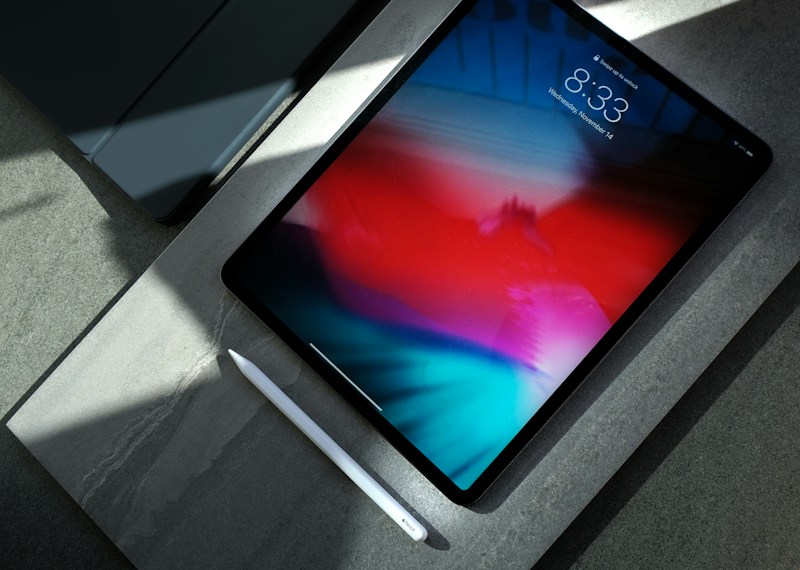
The tandem OLED display is the headline upgrade, and it earns that status. Two OLED panels stack together, each running at lower brightness to extend lifespan while combining for peak brightness that reaches 1600 nits for HDR content. SDR brightness hits 1000 nits, a massive improvement over the previous mini-LED display.
Black levels are true black, as expected from OLED. But what matters more is the contrast in everyday content: text looks crisper when surrounded by genuine black rather than dark gray. Photos and videos pop with dimensionality. Dark room usage is transformed; the backlight bleed and blooming that plagued mini-LED are gone.
Color accuracy is excellent out of the box, meeting DCI-P3 standards. The screen is factory-calibrated for creative professionals who need to trust what they see. ProMotion adaptive refresh up to 120Hz remains, ensuring smooth scrolling, responsive pencil input, and efficient power use when high refresh isn't needed.
The nano-texture glass option reduces reflections for additional cost. It's worth considering for those who work near windows or under harsh lighting. The matte finish changes the pencil feel slightly—closer to paper, which some artists prefer. Both options are excellent; standard glass has deeper blacks, nano-texture has better glare handling.
Performance: M4 Dominance
The M4 chip debuts here before appearing in Macs, signaling the iPad Pro's position in Apple's lineup. A 10-core CPU with 4 performance and 6 efficiency cores handles everything you can throw at it. The GPU scales up to 10 cores depending on configuration, delivering serious graphics capability for creative applications.
Benchmarks show generational improvements, but numbers don't capture the experience. Everything feels instant. 4K video editing in LumaFusion with multiple tracks and effects doesn't stutter. Exporting is shockingly fast. Procreate handles massive canvases with hundreds of layers. Logic Pro manages complex compositions without dropping frames.
The Neural Engine is enhanced for AI workloads, a foundation for future intelligence features Apple is developing. Current uses include improved photo computational photography, enhanced writing tools, and on-device processing for privacy-sensitive AI features. Expect this to matter more as iPadOS gains more AI capabilities.
RAM increases in higher-storage configurations, with 8GB standard and 16GB in 1TB and 2TB options. For creative professionals, the higher RAM unlocks more simultaneous layers in art apps, bigger project files in video editing, and more headroom for multitasking. Consider future needs when choosing storage and RAM.
Apple Pencil Pro
The new Apple Pencil Pro adds features that once again raise the bar for stylus input. The squeeze gesture introduces a programmable action—squeeze the pencil to bring up tool palettes, switch brushes, or trigger custom actions. It sounds minor but significantly speeds workflows once muscle memory develops.
Barrel roll detection senses the angle at which you're holding the pencil and adjusts brush strokes accordingly. Shaped brushes like calligraphy pens respond naturally to rotation. Simple in concept but surprisingly impactful—it brings another dimension of real-pencil behavior to the digital experience.
Haptic feedback provides subtle taps when selecting tools, confirming gestures, or interacting with controls. You feel the interaction, making the digital experience more tactile. Combined with the already-excellent pressure sensitivity and palm rejection, the Pencil Pro is the most complete digital stylus available.
Find My integration helps track a misplaced Pencil—a chronic problem for stylus users everywhere. It won't find a Pencil left at a coffee shop, but it'll show the last known location if it's somewhere in your home or office. A small feature that solves a real problem.
iPadOS and Productivity
The iPad Pro's eternal question: can it replace a laptop? iPadOS continues improving, but the answer remains "depends on your work." Stage Manager has matured, offering better window management and external display support. You can now have multiple apps across multiple windows on an external 6K display while running different apps on the iPad itself.
Final Cut Pro and Logic Pro on iPad are legitimately powerful, approaching their Mac counterparts. For music production and video editing, the iPad Pro is now a viable primary device. The new Final Cut Pro Camera feature turns the iPad into a professional monitor for iPhone cameras with live color grading—innovative pro workflow.
File management remains iPadOS's weakness. The Files app improves but still lacks the flexibility of desktop file systems. External storage support works but with compromises. If your workflow revolves around organizing many files across complex folder structures, expect frustrations.
Development remains limited. Xcode exists only as Swift Playgrounds on iPad. Terminal apps exist but without the system access developers need. Web development works with limitations. For software development, the iPad Pro isn't a replacement for a Mac—though coding Swift UI interfaces with instant preview works surprisingly well.
Accessories and Ecosystem
The new Magic Keyboard is thinner and lighter, matching the iPad's redesign. The keyboard feel is excellent, the trackpad is responsive, and the function row adds convenient controls. But the price is steep—nearly a third of the base iPad's cost. It's excellent if you need frequent laptop-style typing; expensive if you occasionally do.
Smart Folio provides basic protection and stand functionality without keyboard or trackpad. For those using iPad primarily as a tablet with occasional Pencil use, it's a sensible, cheaper option. Neither accessory protects the Pencil attachment area on the edge—dropped iPads can still damage attached Pencils.
The ecosystem advantage is significant for existing Apple users. Handoff lets you start work on iPhone and continue on iPad. Universal Clipboard shares copied content across devices. Sidecar lets Mac users extend their display to iPad. These features compound in value the more Apple devices you use.
Who Should Buy?
Creative professionals—artists, video editors, musicians—will find the most value here. The display, performance, and Pencil Pro combine for a genuinely superior creative tool. If you make art or content professionally, the investment returns in productivity and capability.
For general consumers, the M4 iPad Pro is likely overkill. The iPad Air handles most tablet tasks excellently at significant savings. Unless you specifically need the OLED display, M4 performance, Pencil Pro features, or Thunderbolt connectivity, consider whether the premium is justified.
Students and professionals who want tablet-laptop versatility benefit if their needs align with iPadOS capabilities. Content consumption, note-taking, research, writing, and presentations work excellently. But check that your specific software needs are met—missing one critical app or workflow can derail the laptop-replacement dream.
Verdict
The iPad Pro M4 is the most impressive tablet ever made. The display is stunning, performance is excessive, and the complete package with Pencil Pro and accessories offers something genuinely unique. It pushes what tablets can be further than any previous iteration.
Whether it's right for you depends on use case and budget. As a creative tool, it's exceptional. As a media consumption device, it's overkill but delightful. As a laptop replacement, it's closer than ever but still compromised for certain workflows. Apple's vision of the future of computing is compelling—it just hasn't completely arrived yet.